Buffers
Device buffers
The DeviceArray class represents GPU memory. It
cannot be read or written directly, but otherwise tries to provide an
interface similar to numpy: instances have a shape, dtype, strides and so on.
However, currently only C-order layout can be created.
In the simplest case, construction works similarly too, but requires the context to be passed:
buf = katsdpsigproc.accel.DeviceArray(ctx, (3, 5), np.float32)
This creates a 3×5 buffer with uninitialized content.
Padding
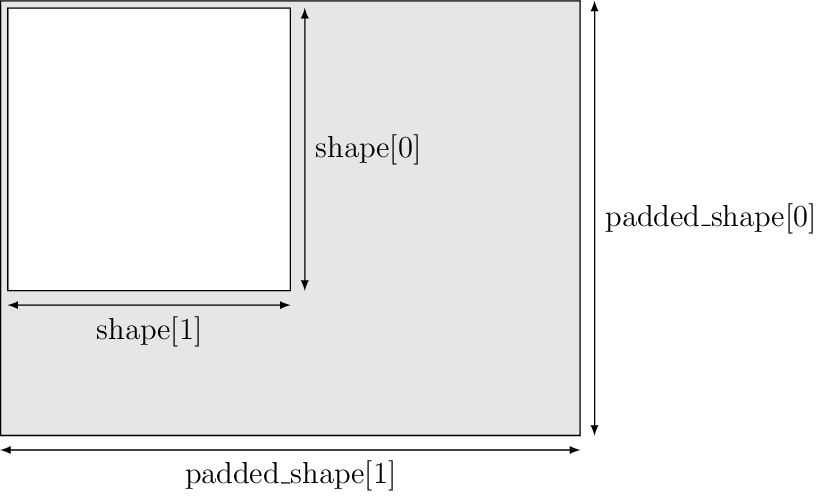
Because GPUs operate on fixed-size work groups, it is often necessary or just convenient to include padding in buffers so that the GPU code doesn’t need to include special-case handling for the boundaries. The constructor takes an additional padded_shape argument which specifies the actual size of the underlying memory allocation, and must be at least as big as the shape on every dimension. The “usable” part of the array is effectively a slice of the top-left corner from the full allocation. It is safe to read and write the padding elements, but their values should be considered as undefined. For example, commands that copy host data to the device might or might not overwrite the padding elements.
Host buffers
Typically there will be some device buffers that need to be copied to and/or
from the host. While regular numpy arrays can be used for this, it is not
efficient, and may involve an extra copy. GPU drivers generally require the
host memory in copies to be allocated in a particular way to allow for optimal
transfers (“page-locked memory” in CUDA parlance). Instead, use the
HostArray class, which is a subclass of numpy.ndarray.
Some care is still needed: it is quite possible to end up with an instance of
HostArray that is nevertheless not on the fast
path. The simplest approach is to start with a device array and call
DeviceArray.empty_like() which returns a matching host array.
Alternatively, one can use the constructor:
host = katsdpsigproc.accel.HostArray(shape, dtype, padded_shape, context=ctx)
For efficient copies, the shape, dtype and padded_shape must all match the device array used in the copy.
Copying and filling
The simplest way to move data from host to device is with DeviceArray.set().
This is a synchronous command: it only returns once the transfer is
complete, and you can immediate start changing the host array. It requires a
a command queue (see Initialization). For example, here is a way to fill a device
array with ones.
import numpy as np

import katsdpsigproc.accel

ctx = katsdpsigproc.accel.create_some_context()
queue = ctx.create_command_queue()
dev = katsdpsigproc.accel.DeviceArray(ctx, (10,), np.float32)
host = dev.empty_like()
host[:] = 1
dev.set(queue, host)
Of course, this is a very inefficient way to fill GPU memory with a constant,
because we’re first filling memory on the host, then copying it across a
narrow bus. Later one we’ll see a utility module for filling device memory
with an arbitrary constant; but for zero-filling there is
DeviceArray.zero().
To copy device memory back to the host, use DeviceArray.get() e.g.
continuing from the example above:
dev.get(queue, host)
It is also possible to omit the second argument, in which case a new
HostArray will be allocated and returned. However, memory allocation
is expensive, so if the transfer will be done many times it is better to
allocate the memory once.
There are also DeviceArray.get_async() and
DeviceArray.set_async() that perform asynchronous transfers: that is,
the function call will return immediately but the transfer will only occur
later. You will need to use synchronization functions
to determine when it is safe to reuse the memory.
It is also possible to copy sub-regions between host and device buffers or from
one device buffer to another. See DeviceArray.get_region(),
DeviceArray.set_region() and DeviceArray.copy_region().